How To Create an Account in the LTMS Portal of the LTO 2026

Creating an account in the LTMS Portal of the LTO is the first step toward accessing online driver’s license and vehicle-related services in the Philippines. With an LTMS account, you can manage transactions, renew licenses, check records, and complete various LTO services without visiting an office. This guide will show you how to create your account quickly and easily.
Quick Answer Box
How do you create an account in the LTMS Portal of the LTO?
To create an LTMS Portal account:
Go to portal.lto.gov.ph (type it directly do not click links from SMS or email).
Click Register Now and accept the Terms of Agreement.
Select Enroll as an Individual.
Fill in your personal details (name, birthdate, contact info, existing license number if applicable).
Click Create Account.
Open your email, find the verification link, and click it within 24 hours.
Set your password and log in.
Registration is completely free. Your 15-digit LTO Client Number arrives via email after successful registration.
What Is the LTMS Portal?
The LTMS Portal short for Land Transportation Management System Portal is the official online platform of the Land Transportation Office (LTO) of the Philippines.
Launched in May 2020 and continuously improved through 2025–2026, the LTMS Portal gives every Filipino motorist a single, secure digital gateway for land transportation services. Whether you are in Manila, Mindanao, or working overseas as an OFW, you can access LTO services 24 hours a day, 7 days a week.
The official URL is: portal.lto.gov.ph
Think of it as your personal LTO dashboard a one-stop hub where you apply for a driver’s license, renew your vehicle registration, check traffic violations, take the CDE exam, and track every transaction you have ever made with the LTO, all in one place.
Pro Tip: Always type the URL directly into your browser’s address bar. Dozens of fake copycat sites have been designed to steal your personal information. Never open the LTMS Portal by clicking a link in an SMS, Facebook post, or email.
Who Can Register for an LTMS Account?
The LTMS Portal is open to a wide range of users. You are eligible to register if you are:
- A Filipino citizen applying for a new driver’s license
- An existing license holder (both Filipino nationals and foreign nationals with a valid ACR)
- A vehicle owner who needs to register or renew motor vehicle registration
- A conductor holding or applying for a conductor’s license
- A public transport operator or transport company representative
- An OFW or Filipino abroad who needs to manage LTO records remotely
- A first-time applicant with no prior LTO records
In short, if you interact with the LTO in any capacity as a driver, vehicle owner, or transport business you should have an LTMS account.
What You Need Before Registering
Gather these requirements before you begin the registration process. Having everything ready will make registration smooth and fast it typically takes under 10 minutes.
For Filipino Citizens

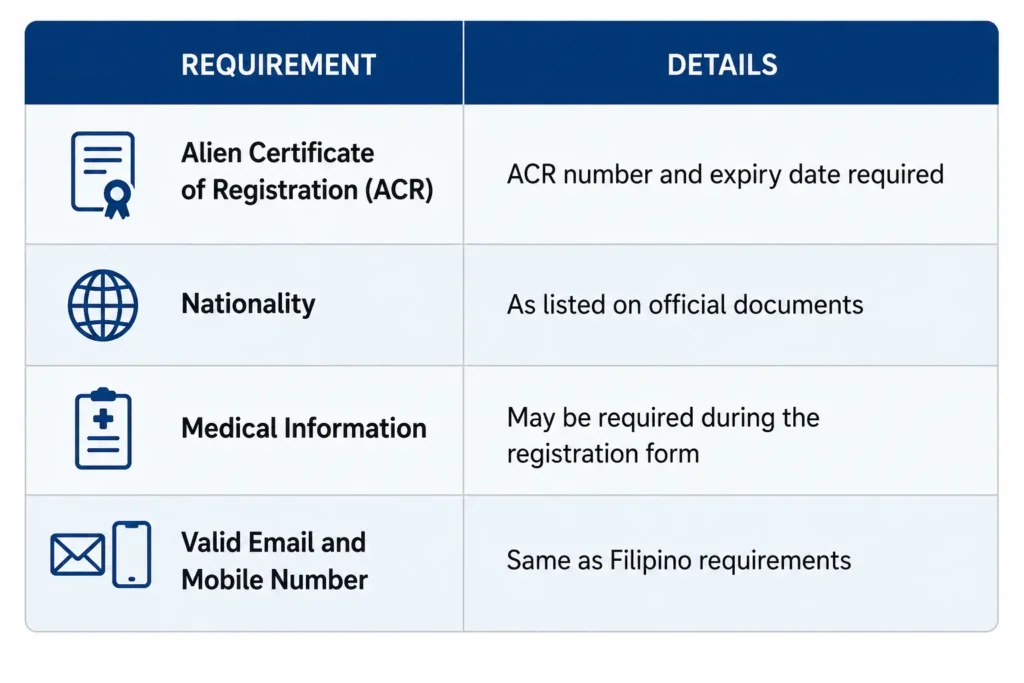
For Foreign Nationals
How to Create an Account in the LTMS Portal of the LTO: step-by-step-guide
Follow these steps carefully. Each step is based on the current version of the LTMS Portal as of 2026.
- Step 1: Go to the Official LTMS Portal: Directly enter portal.lto.gov.ph in your browser’s address bar and verify the URL is correct before providing any personal information to ensure you are using the official LTO website.

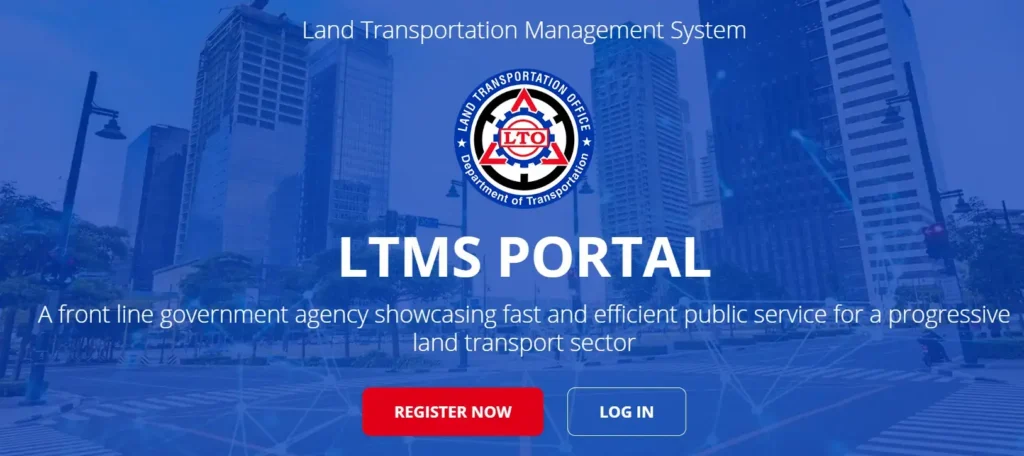
- Step 2: Click Register Now: On the homepage, you will see a Register Now button prominently displayed. Click it to begin the registration process.
- Step 3: Read and Accept the Terms of Agreement: The system will show you the LTO’s Terms of Agreement and Privacy Policy. Read through these carefully.
- Check the “Yes, I accept” box to confirm you agree to the terms.
- Complete the CAPTCHA (the security code or image verification) to confirm you are a real person and not a bot.
- Click the Next button to proceed.
- Step 4: Choose Your Enrollment Type: The portal offers two enrollment options:
- Enroll as an Individual — for personal accounts (drivers, vehicle owners, OFWs)
- Enroll as a Business/Organization — for companies with multiple vehicles or transport-related operations

For most people, select Enroll as an Individual. This guide covers individual enrollment.
- Step 5: Fill in Your Personal Information: The registration form will walk you through several pages. Answer all questions accurately and completely. The information you enter here will be linked permanently to your LTO Client Number.
Page 1 Nationality and Basic Identity:
- Select your nationality (Filipino or foreign national)
- Enter your full legal name (first name, middle name, last name, suffix if applicable)
- Enter your date of birth
- Enter your place of birth
Before creating your LTMS account, make sure you have valid identification documents ready, including a PSA Birth Certificate, active email address, and mobile number.
Page 2 Contact Information:
- Enter your active email address (use one you check regularly)
- Enter your mobile number
- Enter your current home address (province, city/municipality, barangay, street)
Page 3 Existing License Information (if applicable):
- Indicate whether you already hold a Philippine driver’s license or conductor’s license
- If yes, enter your license number, license type, and expiry date
- If no existing license, select the appropriate option for first-time applicants
- Step 6: Review and Submit: Before clicking the final submit button, review all the information you have entered. Errors at this stage can cause delays in your LTO transactions later.
Once satisfied, click the Create Account button.
- Step 7: Check Your Email for the Verification Link: After submitting, the LTO system will send a confirmation email to the address you registered. This email contains:
- Your 15-digit LTO Client Number save this immediately
- A verification link to activate your account
Critical: You must click the verification link within 24 hours. If you miss this window, the system will automatically discard your registration and you will have to start over from Step 1.
Check your spam or junk mail folder if you do not see the email in your inbox within a few minutes.
- Step 8: Set Your Password: After clicking the verification link, you will be directed to a page where you create a secure password for your account.
Choose a strong password that:
- Is at least 8 characters long
- Includes a mix of uppercase letters, lowercase letters, numbers, and symbols
- Is not used for any other online account
Confirm your password and save it in a secure location.
- Step 9: Log In to Your New LTMS Account: Return to portal.lto.gov.ph and log in using the email address and password you just set. You now have full access to your LTMS account and all available LTO online services.
What to Do After Registration
Once you are inside your LTMS account, here are the first things you should do:
- Save your 15-digit LTO Client Number. You will need this for future transactions, appointments, and verifications.
- Upload a profile photo if prompted this is used for your digital driver’s license display.
- Verify your linked license details are correct. If there are discrepancies, you will need to visit your LTO mother file branch to correct them before proceeding with online transactions.
- Explore the dashboard to familiarize yourself with the available services.
Services Available on the LTMS Portal
Your LTMS account gives you access to the following online services:
| Service | Description |
|---|---|
| Apply for Driver’s License | Submit your application for a new non-professional or professional license |
| Driver’s License Renewal | Renew your existing license without going to the LTO office for most steps |
| View Electronic Driver’s License | Access your digital driver’s license directly from the portal |
| Motor Vehicle Registration | Register a new vehicle or renew existing registration |
| CDE Online Validation Exam | Take the Comprehensive Driver’s Education exam required for license renewal |
| E-Learning Module | Access official LTO study materials to prepare for theoretical exams |
| Check LTO Violations | View all recorded traffic violations tied to your license or vehicle |
| Track LTO Transactions | Monitor the real-time status of your pending applications |
| View Submitted Documents | Review all documents you have previously submitted to the LTO |
| Apply for Revision of Records | Request corrections to your LTO records without a full office visit |
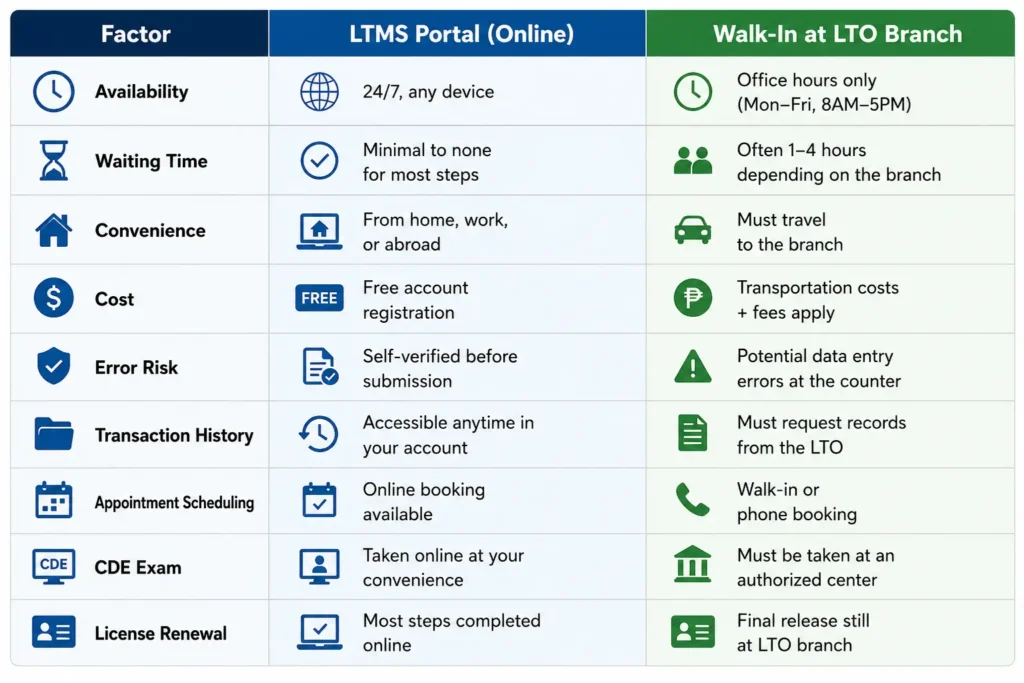
LTMS Portal vs. Walk-In LTO
Tips to Avoid Common Registration Errors
Many applicants run into issues during LTMS registration. Here is what experienced motorists recommend:
- 1. Use a Stable Internet Connection Registration involves several pages and a timed CAPTCHA. A dropped connection mid-process may force you to start over.
- 2. Use a Desktop or Laptop When Possible While mobile registration works, a larger screen reduces the chance of typos in your personal information.
- 3. Enter Your Name Exactly as It Appears on Your PSA Birth Certificate Even minor differences — like using a nickname or omitting a middle name can cause verification problems down the line.
- 4. Use an Email You Have Consistent Access To Do not use a work email or a temporary address. You will need this email for all future LTMS notifications and password resets.
- 5. Check Spam Immediately After Submitting The LTO verification email sometimes lands in spam. Check within the first 5 minutes and whitelist the LTO sender address.
- 6. Do Not Register Multiple Times If the 24-hour verification window expires, do not panic. Simply register again with the same details. Multiple duplicate accounts can cause issues with your LTO records.
- 7. Screenshot Your 15-Digit Client Number Save or screenshot the number in your verification email. This number is your unique LTO identifier and is required for most portal transactions.
Beware of Fake LTMS Websites
This is one of the most important warnings you need to read.
Since late 2025, the Cybercrime Investigation and Coordinating Center (CICC) has logged thousands of complaints from Filipinos who entered their personal details on fraudulent websites designed to look exactly like the official LTMS Portal.
These fake sites:
- Appear in Google search results under similar-sounding domains
- Copy the exact design and layout of the official portal
- Steal your personal information, license details, and contact data
How to protect yourself:
- Always type portal.lto.gov.ph manually into your browser’s address bar
- Never click LTMS links from Facebook, text messages, Viber, or email
- If a site asks you for payment to create an LTMS account, it is a scam registration is always free
- Report suspicious sites to the CICC at [email protected]
Advantages of Using the LTMS Portal
1. Faster Transactions Without the Queue
The LTMS Portal eliminates the need to stand in line at an LTO branch for many transaction types. You submit everything online, and only visit the branch on a scheduled date for document verification or to pick up your physical license or registration.
2. Accessible From Anywhere Including Abroad
OFWs and Filipinos living overseas can manage their LTO records and initiate transactions from wherever they are in the world. This is particularly useful for license renewals that would otherwise require physically returning to the Philippines.
3. Free E-Learning Modules for Exam Preparation
The LTMS Portal includes official LTO e-learning modules that student drivers can use to prepare for the theoretical driving exam. This is especially helpful for busy working adults who cannot attend face-to-face review sessions.
4. CDE Exam Available Online
Drivers renewing their license are required to take and pass the Comprehensive Driver’s Education (CDE) Online Validation Exam. This exam can be completed entirely through the LTMS Portal at your own schedule. Your certificate is sent digitally upon passing — just print it and bring it to the LTO for your renewal.
5. Real-Time Transaction Monitoring
No more calling the LTO hotline or making a trip to the branch just to check if your application has been processed. Your LTMS account shows the real-time status of every pending transaction.
6. Reduces Dependence on Fixers
Fixers and unauthorized agents have historically thrived on the complexity and inconvenience of LTO processes. With the LTMS Portal making transactions simpler and transparent, there is no need to pay for services that are free and accessible online. Using fixers also puts you at legal and financial risk.
7. Permanent Digital Archive of Your LTO Records
Your LTMS account stores your driver’s license details, vehicle registrations, violation records, and submitted documents permanently. Even if you change vehicles or renew your license multiple times, your full history is always accessible.
8. 10-Year License for Zero-Violation Drivers (New in 2026)
As of January 2026, Filipino drivers with zero recorded traffic violations during their previous license period are eligible for a 10-year license instead of the previous 5-year maximum. Your LTMS account makes it easy to verify your violation record before applying.
FAQs About Creating an account in the LTMS Portal of the LTO
Conclusion
Creating an account in the LTMS Portal of the LTO is one of the most practical steps any Filipino motorist or vehicle owner can take in 2026.
The process takes less than 10 minutes, it is completely free, and it gives you permanent, secure access to all LTO services from license applications and renewals, to vehicle registration, violation checking, and the CDE exam.
Key takeaways:
- Go to portal.lto.gov.ph type the URL directly, never click links
- Registration is free and available 24/7
- Verify your account via email within 24 hours or you must re-register
- Save your 15-digit LTO Client Number immediately
- One account covers all your vehicles and LTO transactions
- Beware of fake LTMS websites report suspicious domains to the CICC
Once your account is set up, you unlock a dramatically more convenient way to manage everything LTO-related saving time, reducing trips to the branch, and keeping you safe from fixers and scammers.
If you found this guide helpful, share it with a family member or fellow driver who still has not created their LTMS account yet.