Pay Your Apostille via Landbank LinkBiz: Complete Step-by-Step Guide 2026
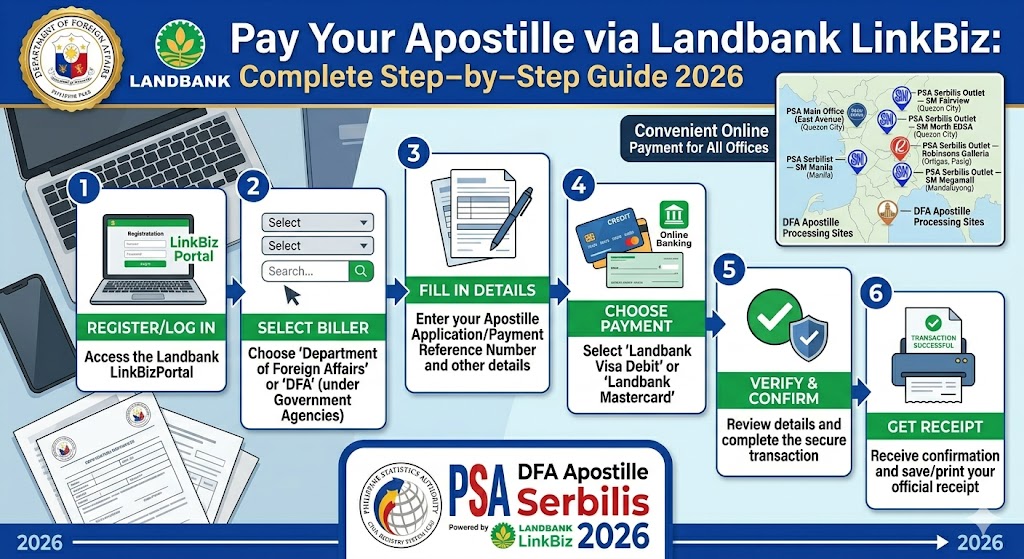
Paying for your Apostille through Landbank LinkBiz is a fast and secure way to complete your document authentication process online. Simply enter your reference number, select the appropriate Apostille service, and make your payment using one of the available digital payment methods. Once your transaction is confirmed, you can proceed with the next steps of your Apostille application without the hassle of visiting a payment center. Landbank LinkBiz supports convenient online payments, helping applicants save time while ensuring a smooth and reliable payment experience.
Quick Answer
To pay your Apostille via Landbank LinkBiz, go to the official Landbank LinkBiz portal, select “Department of Foreign Affairs” as the merchant, choose your transaction type (Single Document-Regular, Single Document-Expedite, or Single DFA e-Apostille for PSA e-Certificates), enter your reference number (or “NA” if you don’t have one yet), then complete payment using your debit card, credit card, or mobile banking app. The standard Apostille fee is Php 100 for regular processing and Php 200 for expedited or e-Apostille processing. You must finish payment within the session time limit, or your transaction will expire and you’ll need to start over.
If you’re applying for an Apostille on a Philippine public document a birth certificate, marriage certificate, NBI clearance, diploma, or similar Landbank LinkBiz is the official, government-sanctioned payment channel the Department of Foreign Affairs (DFA) uses for this transaction. There’s no walk-in cash option anymore. Everything runs through this portal first.
I’ve gone through this process myself and walked several family members through it too, including one OFW relative based in Dubai who had no idea LinkBiz even existed until her HR department mentioned it. The portal isn’t difficult once you know what each screen is asking for but it trips people up because the field labels don’t always match what’s printed on your appointment confirmation or your PSA order. This guide breaks down exactly what to enter, where, and why.
What Is Landbank LinkBiz and Why DFA Uses It
Landbank LinkBiz is the Land Bank of the Philippines’ online payment gateway for government agencies and institutional merchants. The DFA’s Office of Consular Affairs (DFA-OCA) adopted it as the official channel for collecting Apostille authentication fees, replacing the old over-the-counter cash payment system.
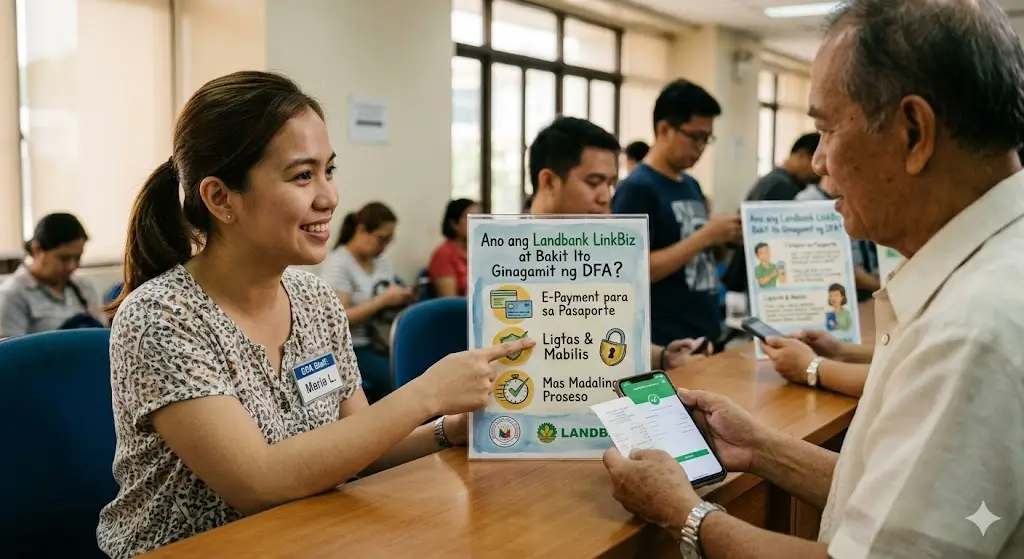
This shift matters for a practical reason: DFA apostille processing now runs almost entirely online, through the Apostille Application and Appointment System (AAAS) at apostille.gov.ph. Appointments are prepaid. You can’t show up at DFA Aseana or a DFA Consular Office and pay at the window anymore your slot won’t even be confirmed until LinkBiz registers your payment.
Think of LinkBiz as the financial bridge between your AAAS booking and your actual appointment. Skip it, or fumble it, and the rest of the process stalls regardless of how complete your documents are.
LinkBiz itself isn’t exclusive to DFA. Landbank uses the same portal infrastructure for dozens of government and private merchants — NBI clearance fees, certain LTO transactions, school payments, and more. The “merchant selection” step exists because of this shared infrastructure, and it’s the single most common point where applicants pick the wrong option.
What You Need Before You Start
Gather these before opening the LinkBiz portal. Having them ready cuts your payment time from 15 minutes of confused tab-switching down to about 3.
- Reference number either your AAAS Appointment Code (for paper Apostille) or your PSA e-Certificate Reference Code (for e-Apostille). If you don’t have one yet, you’ll typically enter “NA.”
- Payment method a debit card, credit card, or access to a mobile banking app linked to Landbank, BPI, BDO, UnionBank, or similar participating banks.
- Valid email address the same one used in your AAAS or PSA application. Confirmation slips and Apostille notifications go here.
- Active mobile number for OTP (One-Time PIN) verification during checkout.
- Stable internet connection LinkBiz sessions time out, and a dropped connection mid-payment can leave your transaction in limbo.
- A second device (optional but recommended) useful if you need to check your email for OTP codes or appointment slips while the payment tab stays open.
Expert tip: Use the same email and mobile number across your AAAS booking, your PSA order, and your LinkBiz payment. Mismatched contact details are the leading cause of “payment not reflecting” complaints, because the DFA’s matching system cross-references these fields automatically.
Paying for a Paper Apostille
This is the route for applicants who need a physical Apostille certificate attached to their document required by countries or institutions that don’t accept electronic verification.
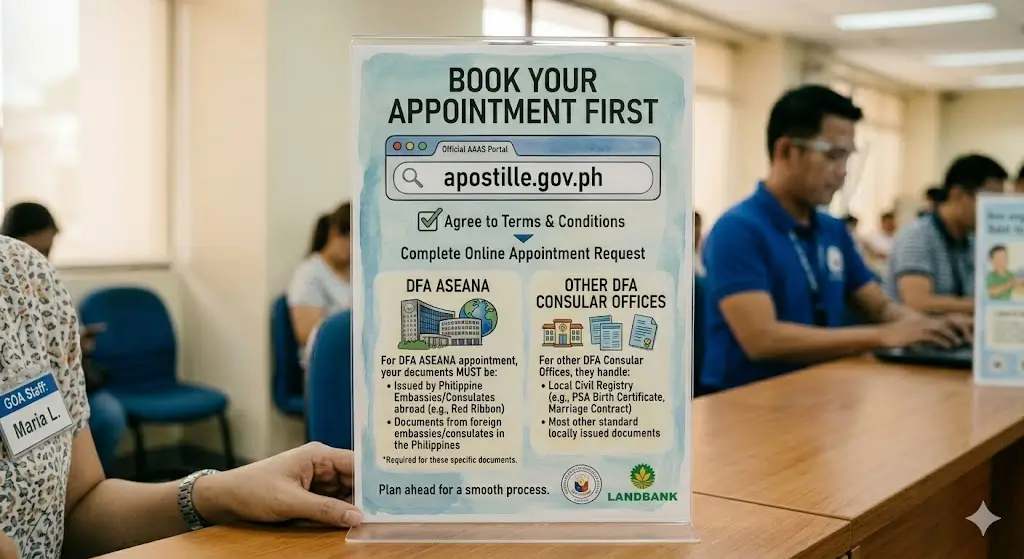
- Step 1: Book your appointment first: Go to the official AAAS portal at apostille.gov.ph, agree to the terms and conditions, and complete your online appointment request. Choose the correct DFA site: DFA Aseana handles documents issued by Philippine Embassies/Consulates abroad and documents from foreign embassies in the Philippines; other DFA Consular Offices handle most standard civil registry and locally issued documents.
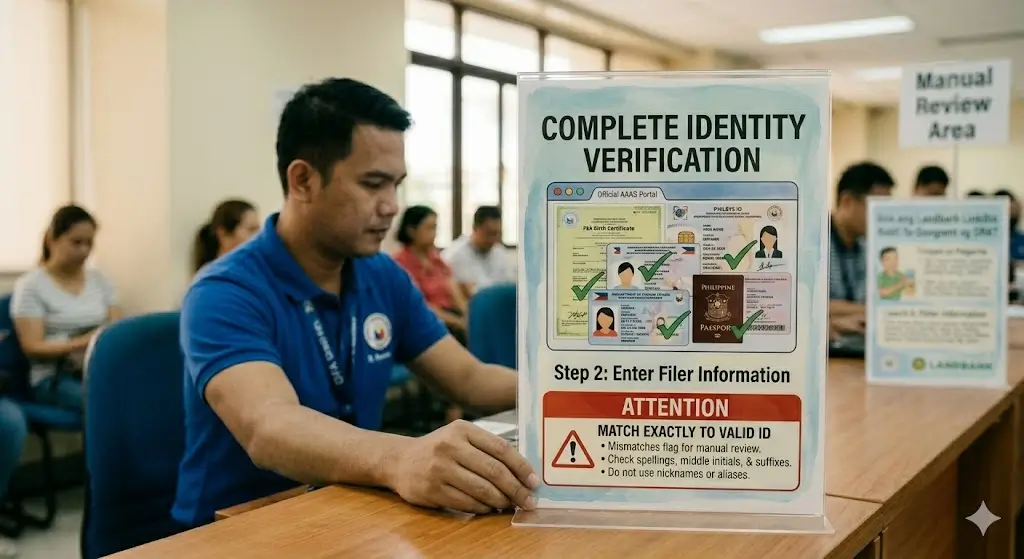
- Step 2: Complete identity verification: Enter filer information exactly as it appears on your valid ID. Even small mismatches (a missing middle initial, a different spelling) can flag your application for manual review.
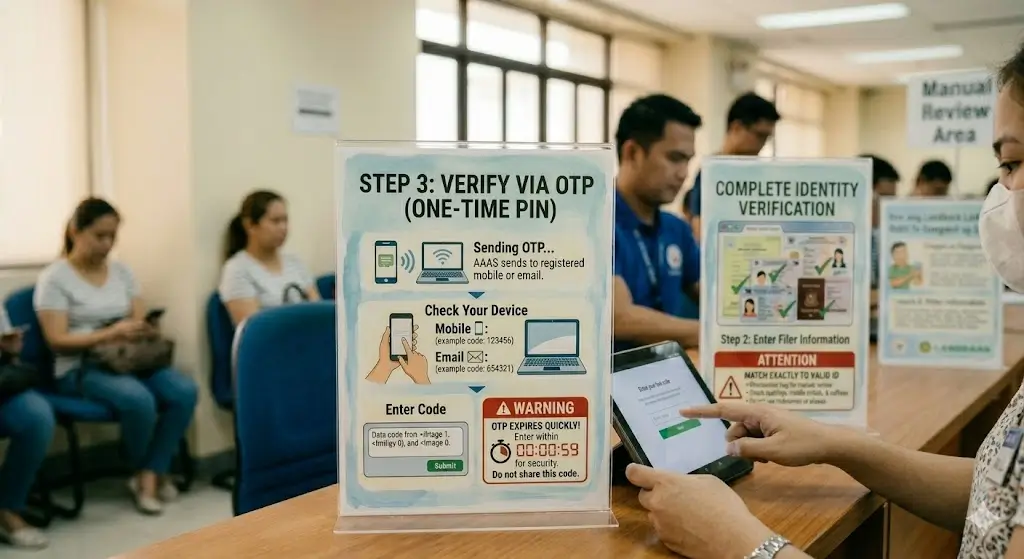
- Step 3: Verify via OTP: AAAS sends a one-time PIN to your registered mobile number or email. Enter it promptly these codes expire quickly.
- Step 4: Note your Appointment Code: This is generated after your slot is confirmed but before payment. You’ll need it for LinkBiz.
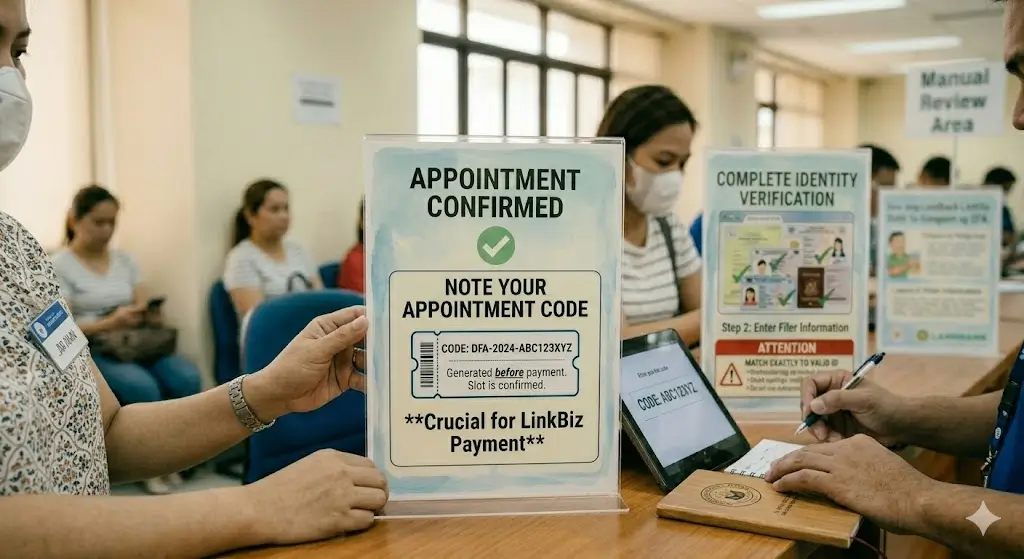
- Step 5: Go to the Landbank LinkBiz Portal at the official Landbank eServices site and click “Pay Now.”
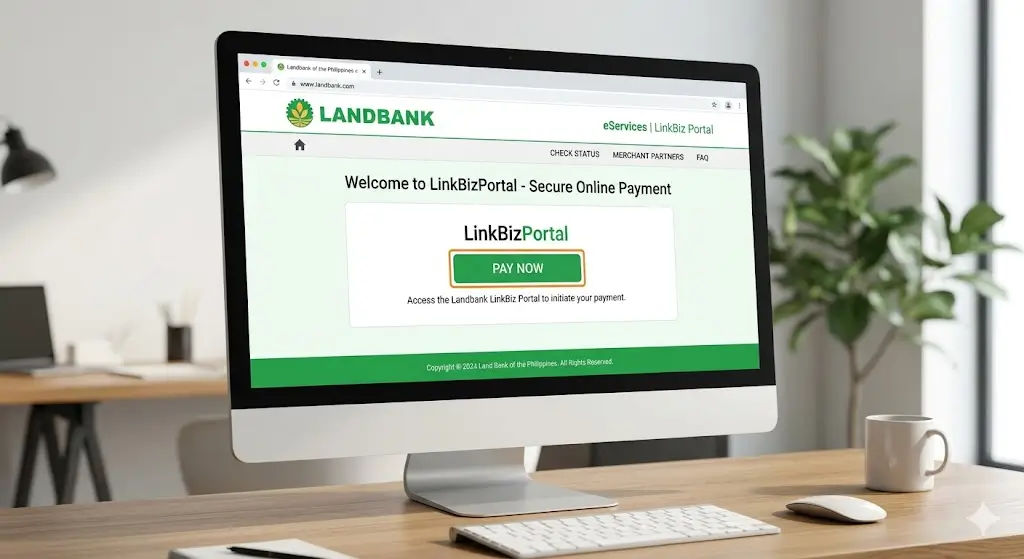
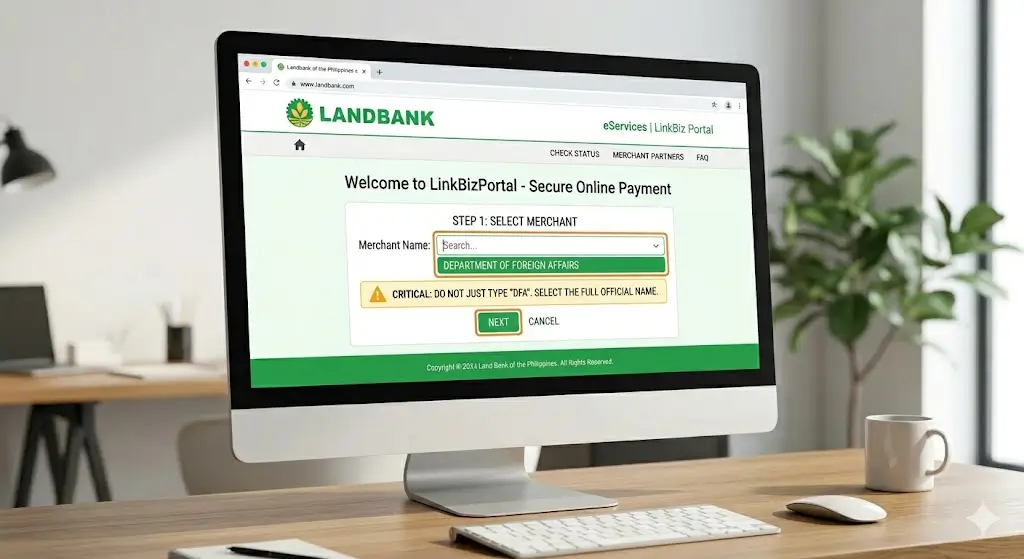
- Step 6: Select the Merchant Name: “Department of Foreign Affairs.” This is the step people most often get wrong typing “DFA” alone or selecting a similarly named entry won’t work. Look for the full official name.
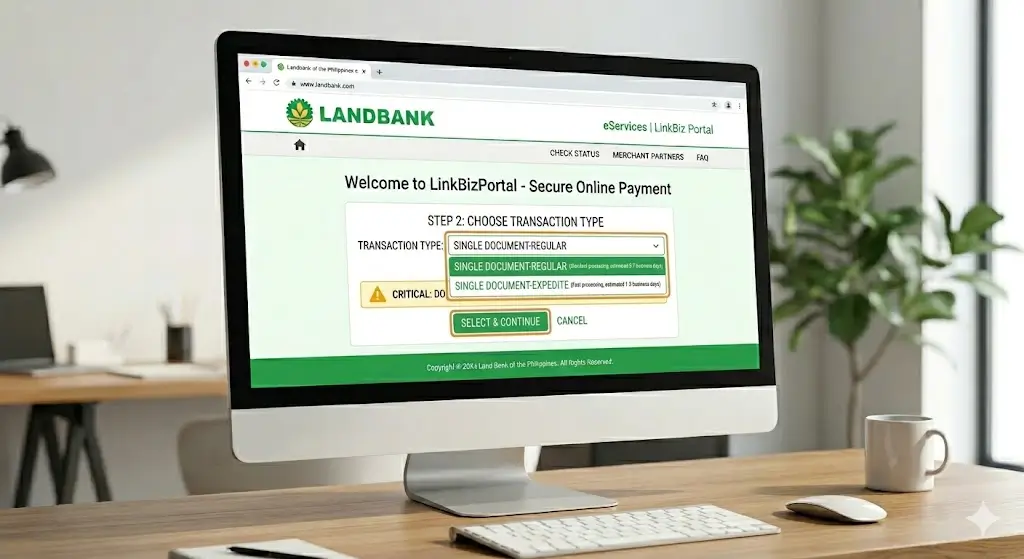
- Step 7: Choose your transaction type: Select either “Single Document-Regular” or “Single Document-Expedite,” depending on your processing speed preference.
- Step 8: Enter your reference number: Input your AAAS Appointment Code in the reference number field. If you genuinely don’t have one at this stage, enter “NA.”
- Step 9: Fill in payer details accurately: full name, contact number, and email, matching your AAAS registration.
- Step 10: Select your payment method and proceed. You’ll typically be redirected to your bank’s own secure checkout page for card or mobile banking authentication.
- Step 11: Complete payment within the session window: LinkBiz and AAAS both enforce a roughly one-hour payment window from the time your slot is reserved. Miss it, and your appointment slot is released back into the pool no extension, no refund.
- Step 12: Save and print your payment confirmation and appointment slip: Most DFA offices require a printed slip at entry; a soft copy on your phone is often not accepted.
Paying for an e-Apostille Step-by-Step
The e-Apostille route applies only to PSA-issued civil registry documents (birth, marriage, death, and CENOMAR certificates) ordered as electronic certificates (e-Certs). It skips the physical document chain entirely.
- Order your PSA e-Certificate through the official PSA online ordering platform, selecting the e-Apostille option where prompted. This generates a Reference Code tied to that specific order.
- Confirm your intended end-user accepts e-Apostilles. Not every receiving institution or country does, even among Apostille Convention members. Check with them before paying — this single step prevents the most common regret applicants report afterward.
- Pay for the PSA e-Certificate itself first. This is a separate fee from the Apostille fee, usually settled through the PSA platform’s own payment options.
- Go to the Landbank LinkBiz Portal once your e-Certificate order is confirmed.
- Select “Department of Foreign Affairs” as the merchant, then choose “Single DFA e-Apostille for PSA e-Certificates” from the transaction dropdown.
- Enter your Reference Code from the PSA e-Certificate transaction — not an AAAS appointment code, since e-Apostille applications don’t require a DFA appointment.
- Complete payment of Php 200, the same fee as expedited paper processing.
- Wait for two separate notifications. First, an email confirming your e-Certificate has been forwarded to DFA-OCA. Second, a follow-up email containing your finished e-Apostille file.
- Download and store your e-Apostille securely. It’s typically a digitally signed PDF. You may forward it directly to your end-user by email, but you cannot request or use a printed version — printing voids its validity.
Real-world example: A reader preparing a marriage certificate for a U.S. visa petition used the e-Apostille route because the receiving USCIS office confirmed electronic copies were acceptable. The full turnaround, from PSA e-Cert order to receiving the e-Apostille email, took four business days — notably faster than the paper route’s appointment-dependent timeline.
Apostille Fees: Regular vs. Expedite vs. e-Apostille
| Transaction Type | LinkBiz Dropdown Selection | Fee (Php) | Processing Time | Output |
|---|---|---|---|---|
| Regular Paper Apostille | Single Document-Regular | 100.00 | Several working days | Physical certificate |
| Expedited Paper Apostille | Single Document-Expedite | 200.00 | Faster turnaround (next working day in many cases) | Physical certificate |
| e-Apostille (PSA e-Cert) | Single DFA e-Apostille for PSA e-Certificates | 200.00 | Typically within a few business days | Digitally signed PDF |
Fees are accurate as of this writing but DFA and Landbank periodically revise them. Always confirm the current amount on the LinkBiz dropdown itself before paying — the portal displays live, authoritative pricing.
Paper Apostille vs. e-Apostille Which Should You Choose
| Factor | Paper Apostille | e-Apostille |
|---|---|---|
| Document types covered | Any DFA-eligible public document (PSA, NBI, diplomas, SECPA, etc.) | PSA civil registry documents only (birth, marriage, death, CENOMAR) |
| Appointment required | Yes, via AAAS | No |
| Physical pickup or delivery | Yes | No — fully digital |
| Acceptance abroad | Universally accepted among Apostille Convention members | Accepted by many, but not all, member states — verify first |
| Can be printed for use? | Yes, by design | No — printing voids validity |
| Typical speed | Depends on appointment availability and DFA office workload | Often faster since no in-person step is involved |
| Best for | Employment, school enrollment, immigration filings requiring a physical seal | Quick electronic submissions where the receiving party explicitly accepts digital Apostilles |
If you’re unsure which to choose, the deciding question is simple: does the institution receiving your document explicitly accept an e-Apostille? If yes or unsure, ask them directly before you pay switching routes after payment means paying twice.
Common LinkBiz Payment Errors and How to Fix Them
“My payment didn’t go through, but my account was debited.” This usually means the bank-side authentication completed, but the session expired before LinkBiz confirmed it back to DFA’s system. Don’t pay again immediately. Wait 24 hours and check whether your appointment or e-Apostille status updates. If it doesn’t, contact Landbank customer care with your transaction reference.
“I can’t access the LinkBiz portal at all.” This is a known issue for applicants based outside the Philippines, since LinkBiz is sometimes geo-restricted. Two workarounds exist: have a trusted person inside the Philippines complete the payment using your correct reference number, or email Landbank’s customer care team to report the access issue.
“I selected the wrong transaction type.” If you choose “Regular” when you meant “Expedite,” or vice versa, you generally cannot edit it after payment. You’ll need to contact the DFA Consular Office handling your appointment directly — refunds for transaction-type errors are handled case by case and are not guaranteed.
“My appointment slot expired before I finished paying.” LinkBiz and AAAS both run on a strict payment window, commonly around one hour. If you miss it, your slot releases automatically with no refund and no extension. Start a new AAAS booking — new slots refresh daily, so check back rather than panicking.
“The reference number field is rejecting my entry.” Double-check you’re not mixing up your AAAS Appointment Code with your PSA e-Certificate Reference Code — they’re not interchangeable, and the LinkBiz form will validate against the wrong database if you enter the incorrect type for your selected transaction.
What Happens After You Pay
Once LinkBiz confirms your payment, two things typically happen depending on your route:
For paper Apostille applicants: your AAAS appointment is officially locked in. You’ll receive an appointment slip by email print it, since most DFA offices require a hard copy at entry, not a phone screenshot. Arrive 15–30 minutes early on your scheduled date with your original documents and valid ID.
For e-Apostille applicants: DFA-OCA receives your PSA e-Certificate electronically. You’ll get an email confirming receipt, followed by a second email once your e-Apostille has been generated and signed. No appointment, no physical visit, no waiting in line.
In both cases, keep your payment confirmation and reference numbers saved somewhere accessible not just in your inbox. If a dispute arises about whether payment was received, this is the documentation DFA or Landbank will ask for first.
Paying From Abroad or On Behalf of Someone Else
Many people booking DFA Apostille appointments aren’t in the Philippines when they pay OFWs, immigrants finalizing paperwork from overseas, or family members assisting an elderly relative. A few practical notes for this situation:
- The LinkBiz portal can be geo-restricted in certain countries. If it won’t load, the official DFA guidance is to have someone in the Philippines complete the payment on your behalf, using your correct reference number, or to email Landbank customer care to flag the access issue.
- When someone else pays for you, the reference number and applicant details must still match exactly what’s on file in AAAS or your PSA order — the payer’s name and the applicant’s name are tracked as separate fields, so this generally doesn’t cause confirmation issues.
- International cards sometimes fail at the bank authentication step due to fraud-detection holds, especially for first-time use on a Philippine merchant portal. If your card is declined, try a mobile banking app instead, or ask your bank to pre-clear the transaction.
FAQs About Pay Your Apostille via Landbank LinkBiz
How much does it cost to pay Apostille via Landbank LinkBiz?
Regular paper Apostille processing costs Php 100. Expedited paper processing and e-Apostille processing both cost Php 200. These fees are set by DFA and displayed live in the LinkBiz transaction dropdown.
What merchant name do I select on LinkBiz for DFA Apostille payment?
Select “Department of Foreign Affairs” exactly as listed in the merchant search field. Avoid abbreviations like “DFA” alone, which may not return the correct merchant listing.
What do I enter in the reference number field if I don’t have one yet?
Enter “NA” (Not Applicable). Once you have an AAAS Appointment Code or PSA e-Certificate Reference Code, use that instead, depending on which Apostille route you’re paying for.
Can I pay for my Apostille at a Landbank branch instead of online?
No. DFA’s current process requires prepaid online payment through the LinkBiz portal before your appointment is confirmed. Over-the-counter cash payment at DFA windows is no longer accepted for this transaction.
Is the Php 200 e-Apostille fee separate from the PSA certificate fee?
Yes. You pay for your PSA e-Certificate first, through the PSA’s own ordering platform, and then pay the separate Php 200 e-Apostille fee through Landbank LinkBiz once your e-Certificate order is confirmed.
What happens if my LinkBiz session expires before I finish paying?
Your reserved appointment slot is released automatically, with no refund and no extension. You’ll need to start a new booking through AAAS; slots typically refresh daily.
Can I use a credit card on the Landbank LinkBiz portal?
Yes, LinkBiz generally accepts debit cards, credit cards, and mobile banking apps from major participating banks, though exact supported options can vary and are displayed on the payment method selection screen.
Does an e-Apostille expire?
No, an Apostille (paper or electronic) does not expire — it certifies the authenticity of a signature and seal at the time of issuance. However, the underlying document it’s attached to may be considered outdated by the receiving institution, so always check their specific validity requirements.
Can I print my e-Apostille for submission?
No. Printing an e-Apostille voids its validity. It must be forwarded electronically, typically by email, directly to the intended end-user.
What if I’m outside the Philippines and can’t access LinkBiz?
Have a trusted person in the Philippines complete the payment using your exact reference number, or contact Landbank customer care to report the access restriction.
Conclusion
Paying your Apostille via Landbank LinkBiz comes down to four things: picking the correct DFA merchant listing, selecting the right transaction type for your situation, entering the correct reference number, and finishing payment inside the session window. Miss any one of these, and you’re back at square one not because the system is unreasonably strict, but because Apostille processing is tightly tied to identity verification and appointment scarcity.
A few actionable takeaways before you start:
- Decide between paper Apostille and e-Apostille before you pay — switching after payment usually means paying twice.
- Keep your email and mobile number consistent across AAAS, PSA, and LinkBiz.
- Have your reference number ready and double-check which type it is.
- Print your confirmation slip; don’t rely on a phone screenshot.
- If you’re paying from abroad, have a backup plan in case the portal is geo-restricted.
Once you’ve completed payment and confirmed your appointment or received your e-Apostille notification, the hardest part is genuinely behind you. The remaining steps showing up with original documents, or downloading your digital file — are far more straightforward than the payment process itself.